SaaS Sprawl: How Too Many Apps Increase Cost & Security Risk
Adding a new cloud application is easy. A department can test a tool, enter a credit card, invite employees, and begin working within minutes.
Over time, however, those quick decisions can create dozens of overlapping subscriptions, unused licenses, unmanaged accounts, scattered business data, and unclear ownership.
This problem is known as SaaS sprawl. It develops when an organization’s software-as-a-service applications grow faster than its ability to track, secure, support, and manage them.
The warning signs are not always obvious. Employees may still complete their work, and each individual subscription may appear affordable.
The larger problem becomes visible when the business calculates the total cost, reviews access, investigates a security incident, or tries to recover information from an application nobody knew was still in use.
Controlling SaaS sprawl does not mean forcing every department into one tool. It means knowing which applications exist, why they are needed, what data they hold,
who can access them, what they cost, and whether the business can manage them responsibly.
What Is SaaS Sprawl?
SaaS sprawl is the uncontrolled growth of cloud applications, subscriptions, accounts, integrations, and data across an organization.
It can include approved tools purchased through IT, applications acquired directly by departments, free trials that became permanent processes, browser extensions connected to company accounts, and personal software used for business work.
SaaS application sprawl commonly creates several forms of duplication.
Two departments may purchase different project-management tools. Teams may pay separately for applications already included in a larger business platform. Employees may keep licenses after changing roles. A company may even pay for multiple subscriptions to the same service through different expense accounts.
The number of applications alone does not determine whether a business has a problem. A company may need many specialized tools.
Sprawl exists when growth is not matched by inventory, ownership, security review, access control, spending visibility, and lifecycle management.
Why SaaS Sprawl Develops So Easily
Traditional business software often required installation, infrastructure, procurement, and technical support.
SaaS removed much of that friction. This helped teams move faster, but it also made central oversight easier to bypass.
Common causes include:
● Departments purchasing applications from their own budgets ● Employees signing up for free or low-cost tools
● Urgent projects moving faster than procurement
● Remote and hybrid teams adopting their preferred platforms
● Similar tools being purchased for different teams
● Mergers or acquisitions bringing separate software environments together ● Free trials continuing after the original test
● Former project owners leaving without transferring responsibility ● Applications adding AI, storage, communication, or automation features that overlap with other products
● Weak onboarding and offboarding processes
SaaS adoption is not the problem by itself.
The problem is that each new application can create another identity, data location, contract, vendor relationship, integration, renewal date, and support responsibility.
Without a consistent approval process, small decisions accumulate into an environment nobody fully understands.
How SaaS Sprawl Increases Business Costs
The visible subscription price represents only part of the cost.
A business must also consider licenses, premium features, implementation, integrations, support, training, data migration, and the time employees spend switching between tools.
Unused and Underused Licenses
An employee may receive a license during onboarding and retain it long after changing roles.
Departed users may also remain assigned if offboarding does not include every application.
Some plans charge for seats that have not been used for months. Others renew for another year because nobody reviewed activity before the cancellation deadline.
Usage should be evaluated carefully. A specialist may use a critical application only occasionally. Low activity does not automatically mean the license has no value.
The application owner should confirm the business need before access is removed.
Duplicate Capabilities
Different tools may provide similar functions, such as:
● File sharing
● Project management
● Electronic signatures
● Scheduling
● Forms
● Password management
● Meetings
● Documentation
● AI assistance
Duplication can be reasonable when teams have genuinely different requirements.
It becomes wasteful when the business pays for several applications that solve the same problem without a clear reason.
Unnecessary Premium Plans
Organizations sometimes purchase a higher subscription tier for one feature and assign that tier to everyone.
Others pay for add-ons already included in another platform.
SaaS cost optimization should therefore examine plan levels as well as license counts.
Some users may need advanced capabilities, while others can work effectively with a standard plan.
Fragmented Administration and Support
Every application requires someone to manage accounts, permissions, configuration, vendor communication, renewals, employee questions, and security alerts.
Ten small subscriptions can demand more administrative time than one larger platform.
The indirect cost is easy to miss because it appears across IT, finance, HR, legal, security, and individual departments.
Expensive Data and Workflow Migration
A tool may be inexpensive to purchase but costly to leave.
Export limitations, proprietary formats, complex integrations, and undocumented workflows can make replacement difficult.
The business should understand exit options before an application becomes critical.
SaaS management includes the ability to retrieve company data and move to another service when necessary.
The Main SaaS Security Risks
Every SaaS application expands the environment the business must protect.
It may hold company data, rely on employee identities, connect to other systems, and receive security-sensitive permissions.
The most important SaaS security risks include the following.
Weak or Inconsistent Authentication
Some applications may use company single sign-on and multifactor authentication. Others may rely on separate passwords or personal accounts.
Inconsistent identity controls make it harder to enforce access policies and respond when an account is compromised.
The business may not know which services use a former employee’s password or whether MFA was ever enabled.
Incomplete Employee Offboarding
Removing a Microsoft 365 or primary company account does not automatically remove access from every independent SaaS platform.
If applications are not included in the offboarding process, former employees and contractors may retain accounts, saved files, shared links, API tokens, or mobile access.
Excessive Application Permissions
Applications and plug-ins may request permission to:
● Read email
● View files
● Access contacts
● Manage calendars
● Send messages
● Act on behalf of a user
A useful feature can receive much broader access than it needs.
Microsoft recommends evaluating consent requests and auditing existing grants in its guidance on application consent management.
Permissions should be reviewed before approval and periodically afterward.
An application that was low-risk when first adopted may become more powerful as integrations and features change.
Scattered Sensitive Data
Employees may copy customer information, contracts, meeting recordings, source code, financial data, or internal documents into numerous platforms.
Once data is scattered, the organization may struggle to apply retention rules, respond to legal requests, investigate an incident, or delete information when it is no longer needed.
The risk is not limited to the primary application. Connected subprocessors, plug-ins, backups, exports, and personal accounts may create additional copies.
Limited Security Visibility
Some SaaS products provide detailed logs, administrator alerts, session controls, and exportable records.
Others offer limited visibility or reserve important controls for more expensive plans.
Security teams cannot investigate effectively if they cannot see sign-ins, permission changes, data exports, account creation, or administrative activity.
Vendor and Supply Chain Exposure
The organization depends on every provider’s security, availability, data practices, and incident response.
A weakness at a third party can affect the business even when its own systems are properly secured.
CISA’s guidance for assessing vendors and suppliers encourages small and mid-sized businesses to evaluate cybersecurity practices before entering supplier relationships.
Review should continue after purchase because services, ownership, terms, subprocessors, and security features can change.
SaaS Sprawl and Shadow IT Are Related but Different
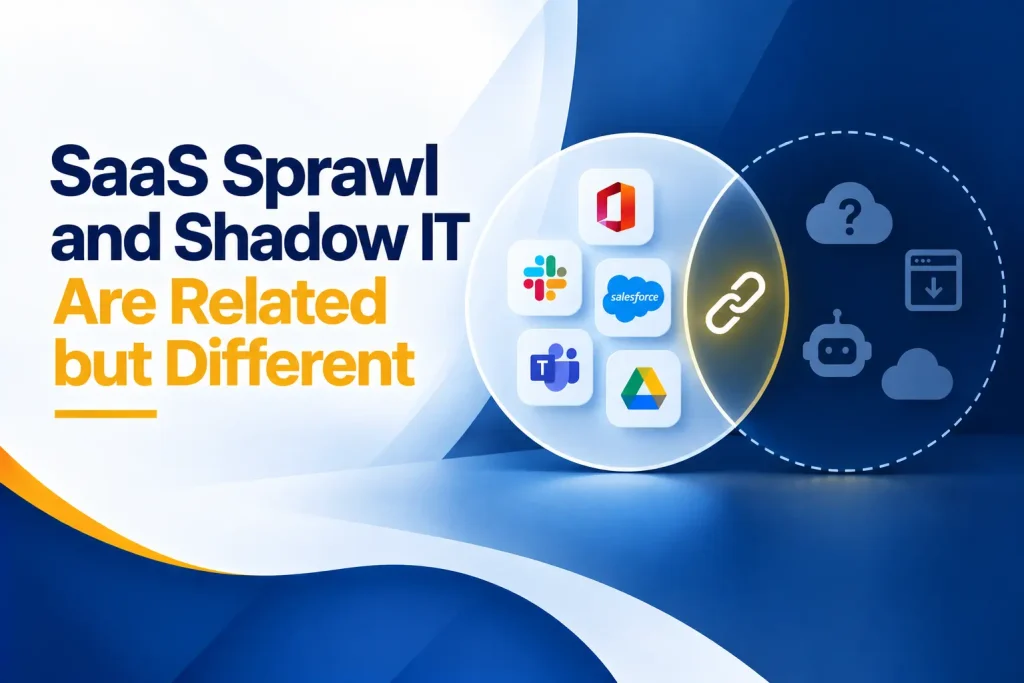
SaaS sprawl describes the overall excess and fragmentation of cloud applications. It can include both approved and unapproved software.
Shadow IT refers specifically to technology used without the knowledge, approval, or management of the appropriate IT, security, or procurement teams.
For example, three approved project-management platforms may contribute to SaaS sprawl even if IT knows about all of them.
A free file-transfer service used by one employee without approval is shadow IT even if the business has very few total applications.
The two problems often reinforce each other.
Unapproved tools increase the application count, while a confusing approved environment may cause employees to look for simpler alternatives.
Microsoft provides a process for discovering, evaluating, sanctioning, and monitoring unsanctioned cloud applications in its guidance on discovering and managing shadow IT.
Blocking an application without understanding why employees use it may create another workaround.
The business should identify the underlying need and provide a safe, practical alternative when possible.
How to Discover Every SaaS Application
No single source will reveal the complete environment. A strong inventory combines financial, technical, contractual, and employee information.
Start with:
● Finance records, credit-card statements, and expense reports ● Procurement records and vendor contracts
● Identity-provider and single sign-on applications
● Microsoft Entra or other enterprise application registrations
● Network, endpoint, proxy, and cloud-discovery information
● Browser extensions and installed applications
● OAuth and application-consent records
● Password-manager entries created for business services
● Department surveys and manager interviews
● Data-processing and vendor-risk records
● Support tickets and integration documentation
Ask employees which applications they rely on, including free tools and personal accounts used for work.
Explain that the purpose is to understand business needs and protect information, not to punish people for solving problems.
The NIST Cybersecurity Framework 2.0 includes maintaining inventories of software, services, systems, supplier-provided services, and designated data.
That principle provides a useful foundation for SaaS application management. An inventory should record more than the application name. Capture:
● Business owner
● Technical administrator
● Users
● Business purpose
● Data type
● Integrations
● Authentication method
● Cost
● Renewal date
● Contract
● Criticality
● Exit process
A Practical SaaS Sprawl Management Process
SaaS sprawl management should be treated as an ongoing lifecycle rather than a one-time cleanup.
Applications will continue to enter, change, and leave the organization.
1. Assign Business and Technical Owners
Every application should have a business owner who explains why it is needed and a technical or administrative owner who manages access, configuration, and support.
If no one accepts ownership, the tool may no longer have a valid business purpose.
2. Document the Purpose and Users
Record the problem the application solves, the teams that use it, and the process that depends on it.
This prevents a cost-cutting exercise from removing a low-usage application that supports an essential monthly, quarterly, or annual task.
3. Classify Data and Risk
Identify the information the tool stores or processes.
A public social-media scheduler has a different risk profile from a platform containing health, financial, legal, employee, or customer data.
Consider whether the application is critical, whether it connects to other systems, and what would happen if it became unavailable or compromised.
4. Review Authentication and Permissions
Use company-managed accounts, single sign-on, multifactor authentication, and role-based access where available.
Review:
● Administrators
● Shared accounts
● External users
● Dormant accounts
● API tokens
● Service accounts
● OAuth permissions
Remove access that is no longer necessary.
5. Analyze License and Feature Usage
Compare purchased seats with active users. Review which features and plan levels are actually required.
Many business platforms provide usage reports.
For example, Microsoft documents how administrators can review adoption through the Microsoft 365 Apps usage report.
Use activity as evidence, not as the only decision. Confirm business needs with the application owner before changing access.
6. Identify Duplicate Capabilities
Group applications by function.
Look for overlapping tools in:
● Storage
● Communication
● Project management
● Forms
● Electronic signatures
● Design
● Scheduling
● Reporting
● Artificial intelligence
● Automation
Then ask whether the difference is valuable.
Departments may need separate tools, but that decision should be intentional and documented.
7. Decide Whether to Keep, Replace, Consolidate, or Retire
Evaluate business fit, security, cost, usage, integrations, contractual requirements, and employee impact.
Do not cancel a tool until:
● Required data has been exported
● Dependencies are understood
● Integrations have been removed or replaced
● Users have been informed
● An alternative is ready
● Retention requirements have been addressed
8. Create an Approval Process
Give employees a fast way to request a new application.
The review should match the risk. A low-cost tool handling public information should not require the same process as a platform connected to customer records.
The review should address:
● Business need
● Existing alternatives
● Data handling
● Authentication
● Permissions
● Security
● Compliance
● Contract terms
● Cost
● Exit requirements
9. Connect SaaS to Onboarding and Offboarding
Role changes, employee departures, and contractor end dates should trigger updates across every relevant SaaS platform.
Central identity management can simplify this process, but independent accounts still require documented removal steps.
10. Review the Environment Regularly
Review new applications, spending, renewals, users, permissions, integrations, dormant accounts, security alerts, and changes in vendor risk.
CISA’s Secure Cloud Business Applications project provides security configuration baselines and assessment resources for commonly used business cloud services.
These resources can help organizations move beyond inventory and examine whether important platforms are securely configured.
When SaaS Consolidation Makes Sense
SaaS consolidation means reducing the number of applications by standardizing on fewer platforms, replacing duplicate tools, or using capabilities already available within an existing service.
Consolidation may make sense when:
● Several tools provide nearly identical functions
● Employees struggle to find the correct application or information ● Data must be copied manually between systems
● Security controls vary widely across products
● Offboarding requires many separate steps
● The cost of maintaining multiple tools exceeds their distinct value ● A strategic platform already includes the required capabilities ● Vendor management and renewals consume too much time
The goal should not be the smallest possible number of applications.
A single suite may not meet every department’s needs. Forcing unsuitable software can reduce productivity or create new shadow IT.
Consolidate where the business can reduce cost and risk without removing important functionality.
Keep specialized tools when their value, controls, and ownership are clear.
How to Reduce SaaS Costs Without Disrupting Work
SaaS cost optimization works best when finance, IT, security, procurement, and department leaders review the environment together.
Begin with upcoming renewals so the business has time to negotiate, resize, replace, or cancel subscriptions.
Annual contracts should be reviewed well before any required notice period. Then look for:
● Unassigned and inactive licenses
● Accounts belonging to departed employees
● Multiple contracts with the same provider
● Premium plans assigned to users who need standard features ● Add-ons duplicated elsewhere
● Free tools creating security or support costs
● Applications with no active owner
● Tools that no longer support a current process
● Duplicate products that can be standardized
● Contracts that can be renegotiated based on actual usage
Protect business continuity during every change.
Export required data, preserve retention obligations, document workflows, test replacements, and communicate with affected users before cancellation.
Short-term savings are not valuable if they cause data loss, break an integration, or force a department into an unsuitable workflow.
Build Sustainable SaaS Application Management
A cleanup project can reduce the current application count.
Sustainable SaaS application management prevents the same problem from returning.
The operating model should include:
● One authoritative application inventory
● Clear business and technical ownership
● Risk-based approval for new tools
● Central purchasing or notification requirements
● Standard identity and MFA expectations
● Permission and integration reviews
● Defined onboarding and offboarding steps
● Renewal reminders with sufficient notice
● Usage and license reviews
● Vendor security reassessment
● Data export and termination procedures
● Employee training and an easy request process
SaaS management should support employees rather than create unnecessary delays.
If approval takes weeks for a low-risk tool, departments may bypass the process.
Create a faster path for low-risk requests and a deeper review for tools that handle sensitive data, connect broadly, or support critical business functions.
What Should a SaaS Management Review Measure?
Metrics help leadership see whether the program is improving cost, control, and security.
Useful measures include:
● Total known SaaS applications
● Percentage with assigned business and technical owners
● Applications using single sign-on and MFA
● Applications holding confidential or regulated information
● Unused and underused licenses
● Duplicate application categories
● Upcoming renewals reviewed on time
● Dormant and former-user accounts removed
● Unapproved applications discovered
● High-risk permissions or integrations awaiting review
● Annual and monthly savings from license changes
● Applications retired with data properly exported or deleted
Do not reward teams simply for reducing the total number.
A lower application count is useful only when the remaining environment still supports the business effectively.
Questions to Ask During a SaaS Audit
For every important application, ask:
● What business process does this tool support?
● Who owns the budget and business decision?
● Who administers the application?
● Which employees, contractors, clients, or guests have access? ● What information does it store or process?
● Does it connect to email, files, identity, finance, or customer systems? ● Which permissions have been granted?
● Does it support single sign-on and MFA?
● What security and activity logs are available?
● How is access removed when someone leaves?
● How many paid licenses are active?
● Does another approved platform provide the same capability? ● When does the agreement renew?
● How can the organization export and delete its data?
● What happens if the provider experiences an outage or breach?
These questions connect SaaS application management with real business, financial, and security outcomes.
How Capitol Technology Can Help
Capitol Technology can help businesses discover and control the applications operating across their environment.
Through our managed IT services, we can help maintain technology inventories, review accounts and licenses, manage onboarding and offboarding, standardize identity controls, document ownership, and plan software changes.
Our data and network security services can help identify risky applications, review access and integrations, strengthen authentication, improve visibility, and protect sensitive information across cloud environments.
We approach SaaS sprawl management as more than a cost-cutting exercise.
The objective is to create an environment that is easier to use, less expensive to maintain, and more secure.
Conclusion
SaaS applications help businesses move quickly, collaborate, and solve specialized problems.
However, easy adoption can create fragmented spending, duplicate capabilities, unmanaged access, scattered data, and hidden risk.
SaaS sprawl becomes manageable when the organization builds visibility.
Discover every application, assign ownership, review usage, understand data and permissions, remove unnecessary access, and plan renewals before they become urgent.
Consolidation can reduce cost and complexity, but it should not be the only objective.
The right application environment gives employees suitable tools while allowing the business to manage identities, information, contracts, security, and change.
Ready to understand which applications your business is paying for and trusting with its data? Contact Capitol Technology for a practical SaaS inventory, cost, and security review.
Frequently Asked Questions
How Do I Know if My Business Has Too Many SaaS Applications?
Your business may have too many applications if departments use overlapping tools, invoices appear without clear owners, former employees retain accounts, renewal decisions happen at the last minute, or nobody can produce a complete application inventory.
The problem is lack of control and value, not a particular number of tools.
How Can SaaS Sprawl Increase Cybersecurity Risk?
Every additional application may create another account, data location, vendor dependency, integration, and permission set.
Unmanaged tools may lack MFA, proper offboarding, security logs, or suitable data protections. More applications also make it harder to detect inappropriate access and respond to incidents.
How Can a Business Find Unused or Duplicate SaaS Subscriptions?
Combine finance records, credit-card statements, procurement contracts, identity-provider data, sign-in information, usage reports, application-consent records, network discovery, and employee interviews.
Group tools by business function, then ask application owners whether low-use or overlapping products are still required.
Should Businesses Consolidate Their SaaS Applications?
Businesses should consolidate applications when doing so reduces cost, complexity, data fragmentation, and security risk without harming important workflows.
Specialized tools may still be appropriate when they provide clear value and have defined ownership, access controls, and management processes.
What Is the Difference Between SaaS Sprawl and Shadow IT?
SaaS sprawl is the uncontrolled growth and fragmentation of cloud applications, whether those tools are approved or not.
Shadow IT is technology used without proper organizational knowledge or approval.
An approved tool can contribute to sprawl, while one unknown application can be shadow IT.